Article
How Backend Engineers Should Think About AI Agents
A practical backend guide to designing AI agents with safe tools, explicit state, handoffs, and verification.
A lot of AI-agent discussion starts in the wrong place.
It starts with the costume.
The agent is described like a digital employee. It has a role, a goal, maybe a name, maybe a voice, and sometimes even a backstory. That can be useful for product design or user experience, but it can also hide the engineering problem.
Backend engineers should not start with the personality. They should start with the control surface.
An AI agent is not interesting because it sounds autonomous. It is interesting because it changes how software decides what to do next.
That is a systems problem.
A useful agent needs a clear operating model: scope, tool access, state, approval points, logs, failure handling, cost controls, and a way to check its work. If those pieces are vague, the agent may still demo well, but it will be hard to trust, debug, or maintain.
So when I think about AI agents, I do not start with “How smart can this be?”
I start with a more backend-shaped question:
What is this system allowed to do, and how will we know whether it did the right thing?
This article includes a short glossary at the end for the acronyms and terms used here.
An agent is not a person
The word “agent” makes people imagine a worker.
That mental model is tempting. A worker receives a task, understands the goal, uses judgment, asks for help when needed, and reports back. That is a natural way to explain the experience to a user.
But as an engineering model, it can be dangerous.
A human worker brings context, accountability, common sense, professional judgment, and an understanding of consequences. A software agent brings a model, a prompt, available context, tool access, control flow, memory, and whatever guardrails the system designer added.
Those are not the same thing.
A better backend model is this:
An agent is a service that can make limited decisions inside a controlled execution environment.
An agent is not a worker. It is a decision point with tools.
That service may use a large language model (LLM) to interpret instructions, plan steps, call tools, read context, transform data, or decide when to stop. But the agent is still software. It still needs contracts. It still needs constraints. It still needs observable behavior.
That is different from a workflow.
A workflow is the path the work follows. It may be a fixed sequence, a queue, a state machine, a cron job, or a chain of services. An agent is one kind of component inside that path. The agent may decide which tool to call next, whether more context is needed, or whether the task should stop. But it should not make the whole system shapeless.
In practice, most reliable systems are agentic in a few places and deterministic everywhere else. Let the model handle ambiguity. Let ordinary code handle routing, authorization, persistence, retries, approvals, and final execution where possible.
If the agent writes files, sends messages, updates tickets, creates pull requests, changes customer data, or spends money through an external application programming interface (API), then it is not just “thinking.”
It is performing side effects.
Backend engineers already know that side effects are where systems become risky.
Start with the boundary
The first question for an agent should be scope.
What task does it own?
Not the vague product claim. The actual operational boundary.
For example, “help with customer support” is too broad. A better boundary might be:
- read the customer question
- retrieve relevant help-center pages
- draft a suggested answer
- include source links
- mark uncertainty clearly
- require human approval before sending
That is much easier to reason about.
The agent has an input. It has allowed context sources. It has a permitted output. It has a human approval gate. It has a clear line it cannot cross.
Backend engineers should be suspicious of agents whose boundary is “do whatever is needed.”
That sounds powerful, but it usually means the design has not happened yet.
A useful boundary answers practical questions:
- What inputs can start the agent?
- Who is allowed to start it?
- What data can it read?
- What tools can it call?
- Which actions are read-only?
- Which actions create side effects?
- Which actions require approval?
- When should it stop?
- What should it return?
- What should it log?
Those questions are not bureaucracy. They are the difference between a system and a stunt.
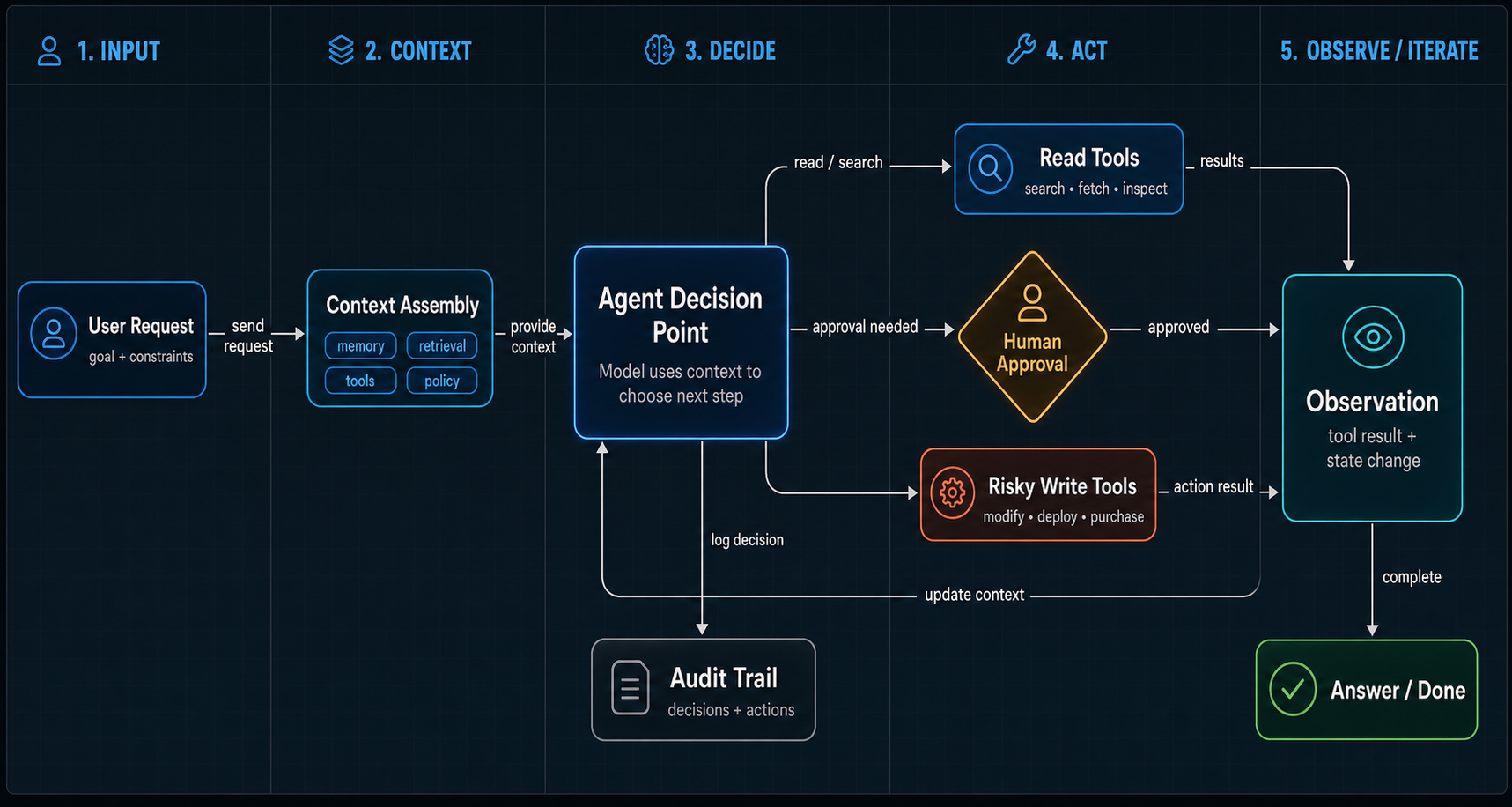
Treat tools like APIs with risk
Tool use is where agents become more than chat.
If an agent can search a codebase, query a database, create a calendar event, send an email, open a pull request, or update a customer record, then the model is no longer only producing text. It is choosing actions that affect other systems.
That makes tool design one of the most important parts of agent design.
A tool should not be a random function exposed to a model because it was convenient. It should be treated like an API surface.
It needs a clear name, a clear schema, predictable inputs and outputs, permission checks, understandable error responses, logging, timeouts, rate limits, and safe defaults.
Most importantly, it needs the smallest useful capability.
Do not give an agent a broad database tool when it only needs to look up one type of record. Do not give it a general file-system tool when it only needs to read a project directory. Do not give it a send-any-email tool when it only needs to draft a reply for review.
Backend engineers already understand this from service design.
A narrow API is easier to secure, test, observe, and evolve. A broad API may feel flexible, but it pushes too much risk into runtime behavior.
For agents, that risk is higher because the caller is partly model-driven.
The practical pattern is simple:
- expose specific tools
- validate every input
- return structured output where possible
- separate read tools from write tools
- require approval for risky write actions
- make repeated calls safe when possible
- log tool calls as first-class events
This is not anti-agent thinking.
It is how agents become usable.
Once tools give the agent reach, state gives it memory. Both need limits.
State is a design choice
Agents often need state.
They may need to remember the current task, previous steps, retrieved context, user preferences, tool outputs, decisions, errors, or pending approvals. But “memory” is too often treated as magic storage for everything the model saw.
Backend engineers should be more precise.
There are different kinds of state:
- conversation state
- task state
- user preferences
- retrieved documents
- tool results
- audit history
- long-term memory
- temporary scratch work
These should not all live in the same place.
Conversation history may help the model understand the current interaction, but it is not the same as a durable record. A retrieved document may be useful for one answer, but it should not become permanent memory by accident. A user preference may be durable, but a failed tool call from three minutes ago probably is not.
Good agent systems decide what state exists, where it lives, how long it lasts, and who can inspect or delete it.
This matters for correctness.
If an agent uses stale state, it may make the wrong decision. If it stores too much, it may leak sensitive context into future tasks. If it stores too little, it may repeat work or lose continuity. If state is invisible, debugging becomes guesswork.
State also affects evaluation.
When an agent gives a bad answer, you need to know what it knew at the time. Which prompt was used? Which tools were called? Which documents were retrieved? Which prior messages were included? Which output was validated? Which step failed?
Without that, “the agent got it wrong” is not a bug report.
It is a fog machine.
Handoffs need contracts
Many useful systems are not one agent doing everything.
They are workflows with handoffs, and only some steps need to be agents.
One component gathers context. Another drafts. Another reviews. Another asks a human for approval. Another executes the final action. Sometimes those components are model-driven agents. Sometimes they are ordinary deterministic services.
The important part is the handoff contract.
If one agent passes work to another, what exactly is passed?
A vague natural-language summary may be enough for a lightweight task. For anything important, the handoff should be more structured.
It might include:
- the original request
- the goal
- constraints
- relevant context
- files or records touched
- tool results
- decisions already made
- open questions
- allowed next actions
- required output format
This is familiar backend territory.
Distributed systems fail when services make different assumptions about the contract. Agent systems have the same problem, except some of the contracts are written in natural language and interpreted by models.
That makes explicit handoffs even more important.
A good handoff reduces ambiguity. It tells the next step what is known, what is not known, and what authority it has. It also gives humans a way to replay the chain, inspect the evidence, and debug the failure when something goes wrong.
The worst handoff is “continue from here” with no durable context and no audit trail.
That may work in a demo. It will not be fun to debug in production.
Verification is part of the agent
The most common mistake with agents is treating the model’s final answer as the result.
For simple text tasks, that may be acceptable. For engineering tasks, operational tasks, data tasks, or anything with side effects, it is not enough.
An agent should not only do work.
It should verify the work it claims to have done.
If it changed code, run the tests or the build. If it created a file, read the file back. If it called an API, check the returned identifier. If it updated a record, fetch the record again. If it summarized a document, preserve citations. If it made a plan, tie the plan to concrete files, commands, or acceptance checks.
This is where backend discipline matters most.
Models can be fluent. Systems need evidence.
Trust is not a tone of voice. It is a trail of checks.
Verification can be lightweight. It does not always need a full test suite. But there should be some external check that is not just the model saying “done.”
A useful agent should be able to report:
- what it changed
- what it checked
- what passed
- what failed
- what it could not verify
- what needs human review
That last part matters.
A trustworthy agent is not one that pretends to know everything. It is one that makes uncertainty visible.
Example: a support-drafting agent
Take the support example from earlier. The product request might be “use AI to help support answer tickets faster.” That is not an agent design yet. It is a goal.
A bad version is: give the model access to support tickets, account data, and the send button, then ask it to be helpful.
A better version is smaller:
The agent drafts a suggested reply for a support ticket. It can read the ticket, retrieve approved help-center articles, inspect non-sensitive account metadata, and produce a draft with citations and uncertainty notes. It cannot send the reply. It cannot issue refunds. It cannot change account settings. If the customer asks for something outside the approved policy, it must escalate to a human.
That gives the system a usable shape.
Inputs:
- ticket id
- customer message
- product area
- account plan and status
- language preference
Tools:
- search approved help-center articles
- fetch ticket history for the same customer
- fetch safe account metadata
- create an internal draft reply
- flag the ticket for human review
State:
- retrieved article ids
- tool results used in the answer
- draft version
- uncertainty flags
- reviewer decision
Verification:
- every factual claim needs a cited source or account field
- the draft must include no unsupported policy promises
- risky requests, angry customers, billing disputes, and legal language require escalation
- the final action is human approval, not automatic sending
This is an agent because the model can interpret the customer’s message, choose which knowledge-base searches to run, decide whether the answer is supported, and draft the response. It is not a free-form worker. The workflow still owns routing, permissions, storage, audit history, and the human approval gate.
That separation is the point. The agent handles the messy language part. The surrounding system keeps the operation safe.
When not to use an agent
Agents earn their keep when the task has ambiguity, varied inputs, context gathering, or multi-step judgment. They are often a poor fit when the task is already deterministic.
Before building an agent, use a simple filter:
- If a rules engine can do it clearly, start there.
- If the action is high-risk and cannot be verified before execution, do not automate it with an agent.
- If the needed data is not available or not allowed to be used, the agent will not fix that.
- If the output has no acceptance check, the system is not ready for autonomy.
- If a human would still need to redo all the work from scratch, build better tooling before building an agent.
Sometimes the right answer is a form, a queue, a script, a search index, or a normal backend service. Do not build the expensive version of a simpler system just because it can be called an agent. Agents are another tool in the system, not a replacement for system design.
A practical way to design an agent
When I design an agent, I like to make it boring first.
Before autonomy, define the workflow.
Before memory, define the state.
Before tool access, define permissions.
Before “reasoning,” define verification.
A simple design checklist looks like this:
-
Define the job.
What specific task should this agent perform?
-
Define the boundary.
What is inside the agent’s scope, and what is outside it?
-
Define the inputs.
What starts the agent, and what context does it receive?
-
Define the tools.
Which tools can it call, and are they read-only or write-capable?
-
Define the permissions.
Which actions require human approval?
-
Define the state.
What should be remembered, where, and for how long?
-
Define the output.
What should the agent return, and in what structure?
-
Define verification.
How does the system check that the result is real?
-
Define failure behavior.
What happens when the model is uncertain, a tool fails, data is missing, or the task is unsafe?
-
Define observability.
What events, traces, costs, decisions, and tool calls are logged?
This kind of checklist may sound less exciting than saying “we built an autonomous agent.”
But it is the work that makes an agent useful.
The real value of AI agents is not that they imitate people.
The real value is that they can help software handle messy goals, natural language, context gathering, and multi-step work in a more flexible way than traditional request-response interfaces.
That flexibility is powerful.
It is also exactly why backend thinking matters.
The agent should not be a black box with a job title.
It should be a bounded system with a contract, a trail, and evidence that it worked.
Glossary
Terms used in this article
- AI - Artificial Intelligence
- Model-powered software behavior used inside a larger engineered system.
- Agent
- A software system that can use a model to decide or execute steps toward a goal, often with access to tools, context, memory, or handoffs.
- API - Application Programming Interface
- A contract that lets software systems communicate.
- LLM - Large Language Model
- The model component that can generate or transform language, code, and structured output.
- MCP - Model Context Protocol
- A protocol for connecting AI applications to external tools and context sources.
- Idempotency
- A property where repeating the same operation produces the same intended result without duplicate side effects.